MLflow Workspaces: Shared Deployment Without Separate Servers

How Workspaces Make Shared Deployments Practical
Organizations that adopt MLflow across multiple teams usually end up choosing between two operating models. They can run a separate MLflow deployment per team, which keeps resources separated but adds user friction and increases operational cost, upgrade work, and infrastructure duplication. Alternatively, they can share a single deployment, which is simpler to operate but quickly mixes experiments, registered models, prompts, and artifacts from unrelated projects.
Shared deployments also make access control harder to manage. Teams often want broad access to their own resources while still restricting other teams, but per-experiment or per-model permissions do not scale well when new resources are created every day. Artifact storage creates a similar problem: once multiple teams share the same server, administrators need predictable storage boundaries without relying on every client to set artifact locations correctly.
Available starting in MLflow 3.10, workspaces were added to solve this organizational and operational gap. A workspace is an optional organizational layer that scopes resources inside a single MLflow deployment, adds workspace-level permissions, and keeps artifact storage aligned with that boundary.

Workspaces let multiple teams share one MLflow deployment while keeping resources, permissions, and artifact paths grouped by workspace.
What Workspaces Add
- Centralized organization for experiments, models, prompts, traces, datasets, AI Gateway resources, and their child resources
- Logical isolation so teams can share one server without mixing day-to-day work
- Flexible access control through workspace-level permissions that apply across all resources in a workspace
- Backward compatibility through the reserved
defaultworkspace for existing deployments - Extensibility through pluggable workspace providers and workspace-aware artifact routing
When workspaces are enabled, child resources inherit the workspace of their parent. Runs, traces, metrics, parameters, and artifacts inherit from the experiment. Model versions inherit from their registered model. This means the boundary is applied consistently without changing the normal MLflow client workflow.
How Workspaces Look in Practice
To enable workspaces, start the MLflow server with a SQL backend, a --default-artifact-root, and
the --enable-workspaces flag. File-based backends are not supported, and existing deployments
should run mlflow db upgrade before turning the feature on:
mlflow server \
  --backend-store-uri postgresql://user:pass@localhost/mlflow \
  --default-artifact-root s3://mlflow-artifacts \
  --enable-workspaces
An administrator can then create a workspace, optionally choosing a workspace-specific artifact root:
import mlflow

mlflow.set_tracking_uri("https://mlflow.example.com")

workspace = mlflow.create_workspace(
    name="team-a",
    description="Workspace for Team A ML projects",
    default_artifact_root="s3://team-a-artifacts",
)
print(workspace.name)
The UI also exposes workspaces directly, making it easy to browse available workspaces, see the last-used workspace, and create a new workspace from the landing page.
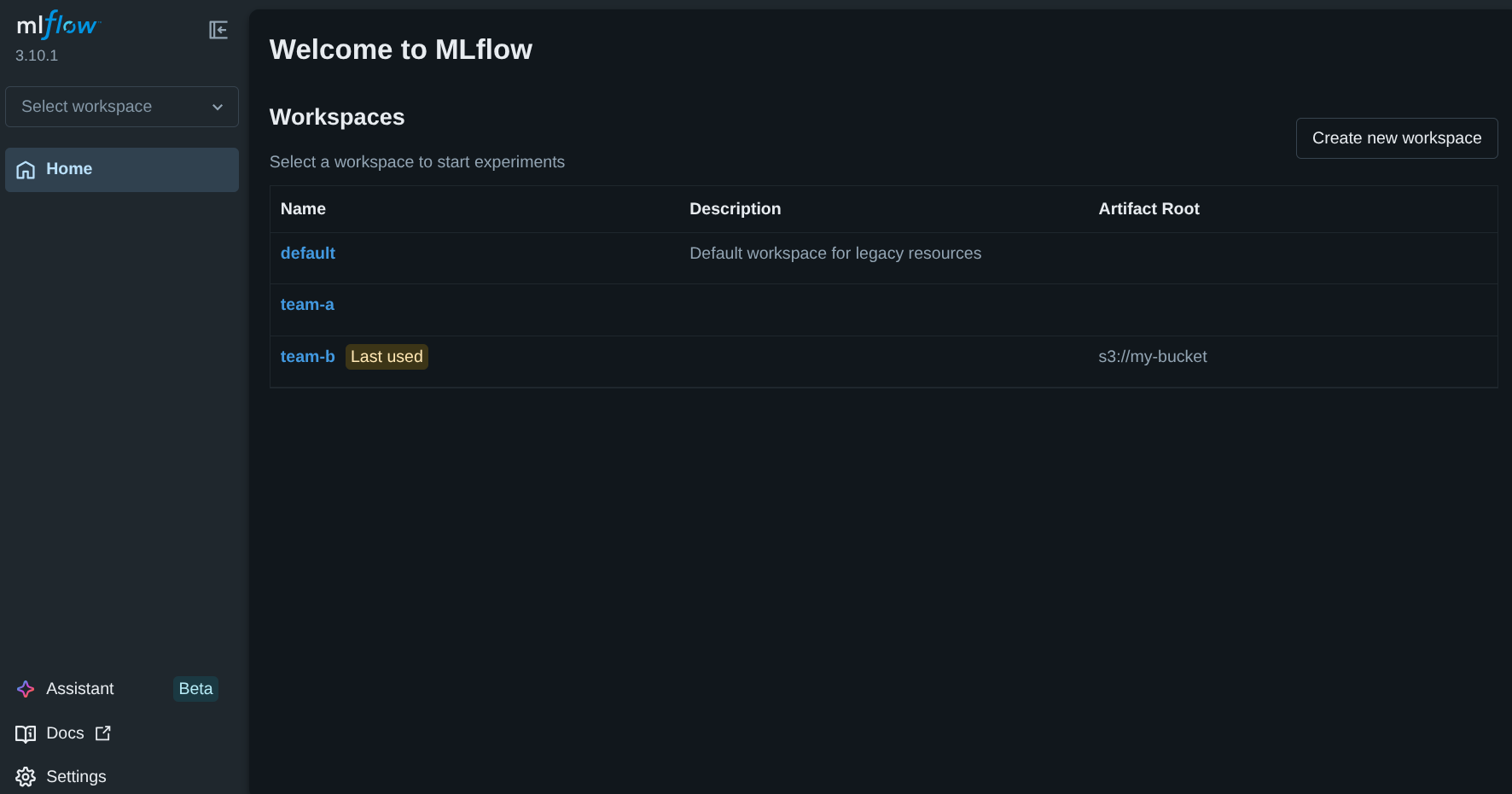
The MLflow UI showing the reserved default workspace alongside user-created workspaces and a
workspace-specific artifact root.
Users select a workspace once and then continue using MLflow as usual:
import mlflow

mlflow.set_tracking_uri("https://mlflow.example.com")
mlflow.set_workspace("team-a")

experiment_id = mlflow.create_experiment("forecasting-baseline")

with mlflow.start_run(experiment_id=experiment_id):
    mlflow.log_param("learning_rate", 0.01)
    mlflow.log_metric("rmse", 0.81)
REST clients can use the same server by sending an X-MLFLOW-WORKSPACE header:
curl -X POST https://mlflow.example.com/api/2.0/mlflow/experiments/create \
  -H "Content-Type: application/json" \
  -H "X-MLFLOW-WORKSPACE: team-a" \
  -d '{"name": "forecasting-baseline"}'
This is the key design goal: workspaces add organization and policy boundaries without introducing a separate client API or a different deployment model for every team.
Permissions Without Permission Sprawl
In deployments with authentication enabled, workspace permissions provide a convenient fallback for
all resources in a workspace. If a user does not have an explicit resource-level permission, MLflow
falls back to the workspace permission for that resource's workspace. This lets administrators
grant broad access to a team without managing each experiment, model, prompt, or AI Gateway
resource one by one. The same permission levels used elsewhere in MLflow apply at the workspace
level: READ, USE, EDIT, MANAGE, and NO_PERMISSIONS.
There is an important nuance here: direct resource permissions and workspace permissions are not
identical. A user can have access to a specific experiment in team-a without having workspace-
level access to team-a as a whole. In that case, the resource remains accessible, but
mlflow.list_workspaces() will not list that workspace for the user. This behavior keeps workspace
discovery aligned with workspace-level authorization rather than with isolated exceptions.
Artifact Isolation and Backward Compatibility
Artifacts are isolated by workspace by default. New experiments created in a workspace use an artifact location under:
<default_artifact_root>/workspaces/<workspace-name>/<experiment-id>
If a workspace sets its own default_artifact_root, new experiments use that root instead. This
is useful when different teams need separate buckets, prefixes, or storage policies.
To preserve that isolation boundary, clients cannot set artifact_location directly when
workspaces are enabled. The server owns artifact placement so that one workspace cannot accidentally
or intentionally write outside its assigned layout.
Existing deployments remain backward compatible through the reserved default workspace. When
workspaces are enabled on an existing server, legacy resources are placed in default and keep
their stored artifact locations. For installations that already use basic-auth, administrators
should set grant_default_workspace_access = true in
basic_auth.ini
during the transition so existing users can still access those legacy resources.
Flexible Design for Platform Teams
Some organizations want workspaces to map directly onto existing platform concepts such as Kubernetes namespaces, internal project catalogs, or identity-provider groups. Workspaces were designed for that use case.
MLflow uses a pluggable workspace provider interface, exposed through the
mlflow.workspace_provider entry point. The workspace providers
documentation covers
the plugin model in more detail. The default SQL provider stores workspace metadata in the tracking
database, but a custom provider can define how workspaces are listed, resolved, and provisioned.
For artifact storage, administrators can start with the default prefix-based layout and only move
to custom routing when it is actually needed.
Artifact repositories can also implement for_workspace() to return a workspace-specific instance.
This makes it possible to route one workspace to a dedicated S3 bucket, choose credentials
dynamically, or apply storage policies that differ by team. If MLflow is serving artifacts, this
can also allow a single MLflow deployment to serve artifacts from multiple S3 buckets based on the
active workspace.
Workspaces Are Not a Hard Isolation Boundary
Workspaces provide logical separation and authorization controls inside one MLflow deployment. They are a strong fit for shared infrastructure, but they are not a substitute for fully independent deployments when strict compliance or data-plane isolation is required.
If teams require separate networking, separate credentials at the service boundary, or hard guarantees that all data stays in isolated infrastructure, they should run separate MLflow servers. Workspaces are intended to reduce operational duplication inside a shared deployment, not to replace hard multi-tenant isolation.
Getting Started
If you want to try workspaces today, start with the docs below:
- Workspaces overview
- Getting started with workspaces
- Workspace configuration
- Workspace permissions
- Workspace providers
The workspaces feature was also covered in the MLflow 3.10 webinar, including the UI flow for creating workspaces and assigning permissions.
If this model fits your deployment, try it on a shared MLflow server and let us know what integration patterns or permission models you still need. Feedback and contributions are always welcome through GitHub Issues and GitHub Discussions.